A comprehensive overview of general purpose graphics processing unit (GPGPU) computing, how modern GPU hardware execute compute shaders, and best practices for applications and games.
Tags: bloggpgpurdna2gpushaderkernel
GitHub Comments
General Purpose Graphics Programming Unit (GPGPU) computing is an effective way of using all of the computational resources your computer has to offer by offloading work to the GPU, making it an easy way to access heterogeneous parallel computing. Even though the "G" in GPU stands for graphics, it's more accurate to call modern GPUs highly parallel general processors capable of processing large quantities of data quickly thanks to having a large number of simple microprocessor cores, called Stream Processors (AMD) or Compute Unified Device Architecture (CUDA) cores (NVIDIA), or just GPU cores in other architectures like the Apple M series or Qualcomm Snapdragon. These microprocessor cores are designed to not perform well with latency or branching, but instead focus on throughput [Hwu et al. 2022]. This architecture is designed around processing large amounts of data with a single instruction, otherwise known as a Single Instruction Multiple Data (SIMD) or more accurately Single Instruction Multiple Thread (SIMT) architecture, where a group of threads process a single instruction in lock-step.
GPUs can be asked to perform local arithmetic operations, transcendental operations that cost 4 cycles such as square roots, cosine/sine, load/store operations, hardware accelerated ray tracing traversal or matrix multiplications for executing machine learning (ML) models, making them both general and application specific depending on the workload.
Compute shaders (or kernels) are programs that execute computations on the GPU, and are useful for a variety of tasks within and outside of computer graphics:
Executing and Training ML Models - From Leaky ReLUs to convolutions, machine learning models can be written as shader code and execute quickly and easily.
Geometric Processing - every aspect of ray tracing, from the routines to trace rays, build bounding volume hierarchies (BVHs), and updating them, can be done by the GPU, which can process large quantities of triangle data in real time. Physics simulations such as rigid bodies can be simulated by processing vertices.
Encoding/Compression - Video encoding, compressing mesh data, compressing frame buffer attachments such as 3D normals to 2D view space normals.
Postprocessing - traditional fragment based post-processing effects can be easily rewritten as compute shaders and executed more efficiently and even at the same time.
Materials and Lighting - Some games opt to use compute shaders in tandem with lookup structured buffers to add a level of abstraction from rasterization, with Nanite using software rendering in combination with meshlets; Mortal Kombat 11 indexed material IDs from a given fragment for its lighting passes.
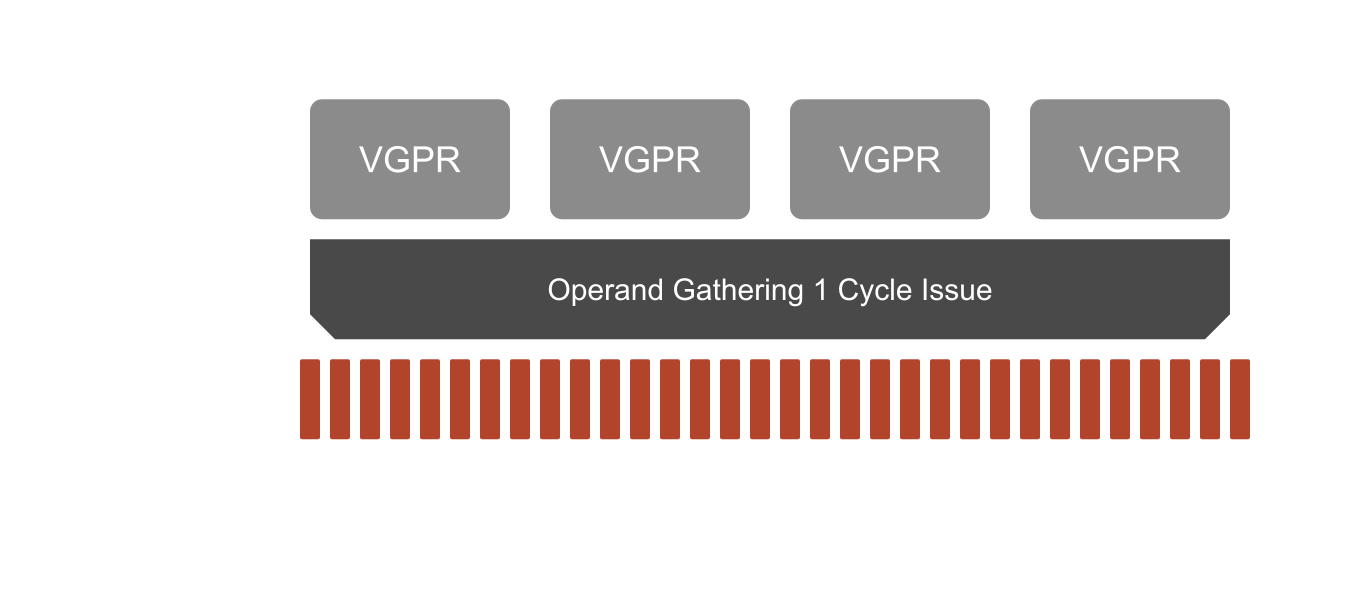
When processing a compute shader, every scheduled microprocessor (96 Compute Units (CUs) with 64 shading units each for a maximum of 6144 stream processors on a 7900 XTX) receives the same instructions, with the only differences being what the current thread ID is for that a single thread, which waves are on which instruction, and what data is accessible between threads of the same threadgroup:
Groups of threads are further grouped together in hardware in what's called a Wave (DirectX), Subgroup (Vulkan), Wavefront (AMD), SIMD Group (Apple), or Warp (NVIDIA CUDA). On both recent AMD and NVIDIA hardware, waves have 32 lanes, with each lane executing one thread. Older AMD hardware traditionally uses 64 threads per wave.
Since these terms are different for every hardware vendor and graphics API, we'll stick with the word threadgroup for all general mentions of groups threads, and wave for mentions of hardware groups of 32-64 threads, unless working in a specific graphics API.
Let's review GPGPU computing, the terminology, and techniques involved in writing GPGPU programs in different graphics and compute APIs, with a focus on WebGPU and DirectX 12. We'll cover how to write compute kernels to do the following:
Convolution - a basic operation that is useful for blurring, sharpening, and executing a machine learning model.
Histogram - Form a summary of your input data that shows how many times a given value appears within a range of values.
Sorting - Sort a list of values from smallest to greatest with radix and merge sort kernels.
A dispatch call in a given graphics API can process groups of work (aptly called workgroups or threadgroups), normally a set of threads that can number anywhere between 8-256, though generally you'll want to stick with groups of 32 or 64 threads, the size of a wave on most hardware, unless your workload would benefit from more data locality over large groups such as a radix sort. In most graphics APIs, the shader itself describes the thread counts for each of these thread groups, Metal is the only API that doesn't have this requirement and lets you set the number of threads per group at dispatch time. Other APIs could do the same however with preprocessor definitions.
A typical application will dispatch a given task across a large workload, then another dispatch that takes the results of that previous pass. For instance, you may need to first sort a list of numbers such as morton codes, then use that sorted list in a separate pass. This is important to note, if a pass requires another to be finished, you must either execute a separate dispatch, or use clever task synchronization methods across an entire dispatch such as using an atomic task counter.
Compute Shader
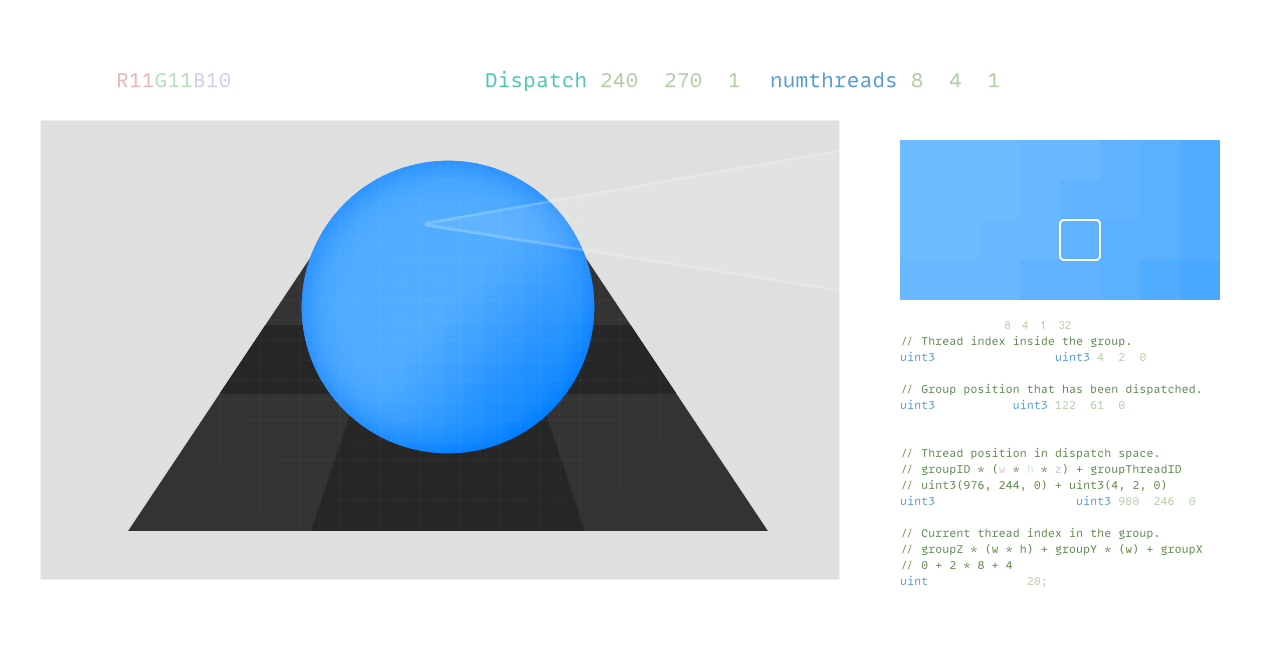
A compute shader consists of a dispatch to a shader kernel that executes groups of threads, each of which has the following basic intrinsics:
// 🫂 Local Group Thread ID@builtin(local_invocation_id) localInvocationID: vec3<u32>
// 👶 Group ID@builtin(workgroup_id) workgroupID: vec3// 🖼️ Dispatch Thread ID@builtin(global_invocation_id) globalInvocationID: vec3<u32>
// 🗂️ Group Index@builtin(local_invocation_index) localInvocationIndex: u32// 🔢 Number of Thread Groups@builtin(num_workgroups) numWorkgroups: vec3<u32>
// 🫂 Local Group Thread IDuint3 groupThreadID : SV_GroupThreadID// 👶 Group IDuint3 groupID : SV_GroupID// 🖼️ Dispatch Thread IDuint3 dispatchThreadID: SV_DispatchThreadID// 🗂️ Group Indexuint groupIndex : SV_GroupIndex// 🔢 Number of Thread Groups// HLSL Has no builtin for the number of workgroups.
// 🫂 Local Group Thread IDgl_LocalInvocationID// 👶 Group IDgl_WorkGroupID// 🖼️ Dispatch Thread IDgl_GlobalInvocationID// 🗂️ Group Indexgl_LocalInvocationIndex// 🔢 Number of Thread Groupsgl_NumWorkGroups
// 🫂 Local Group Thread IDuint3 threadPositionInThreadgroup [[thread_position_in_threadgroup]]
// 👶 Group IDuint3 threadPositionInGrid [[threadgroup_position_in_grid]]
// 🖼️ Dispatch Thread IDuint3 dispatchThreadID [[thread_position_in_grid]]
// 🗂️ Group Indexuint threadIndex [[thread_index_in_threadgroup]]
// 🔢 Number of Thread Groupsuint3 tpg [[threads_per_grid]]
// 🫂 Local Group Thread ID
uint3 threadIdx;
// 👶 Group ID
uint3 blockIdx;
// 🖼️ Dispatch Thread ID (You must compute this yourself):
uint3 dispatchThreadIdx = blockIdx * blockDim + threadIdx;
// 🗂️ Group Index (You must compute this yourself):// 🔢 Number of Thread Groups// 🎡 Group Size
uint3 blockDim;
Group Thread ID - What thread you're currently working on within a workgroup.
Group ID - What workgroup you're currently exectuing in, useful for designating certain workgroups for the final parts of an algorithm such as prefix sum.
Dispatch Thread ID - The actual thread that's currently being executed by the hardware, the "pixel" in the case of a screen space dispatch.
Group Index - a linear representation of the current thread index.
Number of Thread Groups - What's passed as arguments to your dispatch, the number of thread groups currently executing for this shader kernel.
In addition, you can take advantage of shared memory across a given workgroup
Each workgroup can allocate memory within that group that can be shared between threads of that group. This can be used as a local cache across the whole threadgroup to do privatization of the final resultant data structure, enable scan algorithms like Kogge-Stone and Brent-Kung, prefix sum of a given value in every thread, radix binning, sweeps, scatter, and compaction. These primitives can then be used to do more advanced workloads like sorting algorithms, building hierarchical structures like BVHs, neural network model execution, and much more.
In the RDNA3 hardware this looks nearly identical to the shader itself, with that data shared within a given compute unit's L1 cache, known as the local data share (LDS). Level cache rules apply to GPUs as well, the more local your data the faster your algorithm can execute, so try to keep data as close to a thread as possible. This means using local variables (which become scalar or vector registers in hardware) more often than global memory such as your strctured buffers, textures, etc.
Atomic Operations
Atomic operations allow for threads to read/write to the same location without worrying about race conditions with data. These operations are significantly slower than standard read/writes, as an atomic operation that is performed by a trailing thread cannot be started until the atomic operation of a leading thread completes. This effectively serializes the atomic operations that are being performed on a memory location, slowing execution down by a factor of 10x [Hwu et al. 2022].
voidInterlockedAdd(in R dest, in T value, out T original_value);
Atomic operations allow for threads to perform logic on a large dataset and write the result to either group shared or global memory. This is useful for performing a variety of tasks such as atomicAdds for prefix sums, atomic min/max for finding the range of points, or atomicXors for compression.
WebGPU is unique in that atomics are strictly typed, whereas with HLSL atomic operations can work on regular memory locations.
Shader Memory Barriers
Barriers allow for a you to guarantee that group shared memory or device memory accesses are finished within a threadgroup.
Shader Model 6.0 introduces wave intrinsics to HLSL, though this is exclusive to both HLSL and GLSL as subgroup intrinsics at the moment. There is a proposal to bring this to WGSL as well.
if (localId == 0)
{
// Your code block...
}
// Vs.bool WaveIsFirstLane(void);
if (WaveIsFirstLane())
{
// Your code block...
}
Conclusion
GPGPU computing is an effective way to solve problems with large datasets, which is why you find it most often used in computer graphics, machine learning, and simulations. The SIMT architecture of the GPU requires that you conceptualize the solution to a problem in a different way, mapping the problem to a large number of groups of threads.
Programming Massively Parallel Processors: A Hands-on Approach, Edition 4 Wen-mei Hwu, David B. Kirk and Izzat El Hajj Morgan Kaufmann 2022 link.springer.com
 Alain Galvan ·Jan 19, 2023 · Updated 1 week ago