Alain Galvan ·4/24/2022 6:00 PM · Updated 4 months ago
An overview of ray tracing acceleration structures, reviewing bounding volume hierarchies, KD-trees, morton codes, and recent papers on the subject.
Tags: blogaabbintersectionaccelerationray tracingbounding volume hierarchy
Acceleration structures as the name implies are spatial data structures that speed up searching for triangles, distance fields, etc. in a given scene. Ray intersection tests for certain shapes like axis aligned bounding boxes (AABBs) are extremely cheap and easy to implement, so by traversing a hierarchical structure of AABBs, you can determine if a triangle is intersected, and use a triangle-ray intersection test to get the necessary data such as barycentrics, interpolated attributes such as normals [McGuire 2018] to perform any number of ray traced effects such as accurate shadows, ambient occlusion, global illumination, reflections, or even a full path tracer [Kajiya 1986] [Pharr et al. 2016].
Controls: Hover over the AABB or triangle to do a ray hit test. Drag horizontally to rotate it.
AABB and Triangle Intersection Tests
// ✅ Boolean tests for AABB and Triangle-Ray intersection. // You may need more information such as baricentric coordinates, // Ray distance, etc. // // Adapted from David Eberly's Geometric Tools // Copyright (c) 1998-2022 | Boost License, v1.0. // https://www.geometrictools.com/GTE/Mathematics/IntrRay3AlignedBox3.h // https://www.geometrictools.com/GTE/Mathematics/IntrRay3Triangle3.h struct AABB { float3 center; float3 extent; }; bool intersectAABB(float3 origin, float3 direction, AABB box) { float3 boxCenter = box.center; float3 boxExtent = box.extent; // Transform the ray to the aligned-box coordinate system. float3 rayOrigin = origin - boxCenter; if (any(abs(rayOrigin) > boxExtent && rayOrigin * direction >= 0.0)) { return false; } // Perform AABB-line test float3 WxD = cross(direction, rayOrigin); float3 absWdU = abs(direction); if (any(WxD > float3(dot(boxExtent.yz, absWdU.zy), dot(boxExtent.xz, absWdU.zx), dot(boxExtent.xy, absWdU.yx)))) { return false; } return true; } struct Triangle { float3 v[3]; }; bool intersectTriangle(float3 origin, float3 direction, Triangle triangle) { float3 diff = origin - triangle.v[0]; float3 edge1 = triangle.v[1] - triangle.v[0]; float3 edge2 = triangle.v[2] - triangle.v[0]; float3 normal = cross(edge1, edge2); float DdN = dot(direction, normal); float sign = 0.0; if (DdN > 0.0) { sign = 1.0; } else if (DdN < 0) { sign = -1.0; DdN = -DdN; } else { // Ray and triangle are parallel. return false; } float DdQxE2 = sign * dot(direction, cross(diff, edge2)); if (DdQxE2 >= 0.0) { float DdE1xQ = sign * dot(direction, cross(edge1, diff)); if (DdE1xQ >= 0.0) { if (DdQxE2 + DdE1xQ <= DdN) { // Line intersects triangle, check whether ray does. float QdN = -sign * dot(diff, normal); if (QdN >= 0.0) { // Ray intersects triangle. return true; } } } } return false; }
A ray intersection test for AABBs or triangles can easily be represented in only a few DirectX Intermediate Language (DXIL) instructions alone, and manufacturers can take that concept even further by converting those instructions to application specific integrated curcuits (ASICs), or even converting other aspects of a ray tracer such as acceleration structure builds [J. Doyle et al. 2012] or traversal [Liktor et al. 2016] [Vaidyanathan et al. 2016] to ASIC hardware.
Hardware accelerated intersection tests is what AMD did with the RDNA2 Architecture. When you executed your DirectX 12 Ray Tracing or Vulkan Ray Tracing shaders:
template<typename payload_t>
void TraceRay(RaytracingAccelerationStructure AccelerationStructure,
uint RayFlags,
uint InstanceInclusionMask,
uint RayContributionToHitGroupIndex,
uint MultiplierForGeometryContributionToHitGroupIndex,
uint MissShaderIndex,
RayDesc Ray,
inout payload_t Payload);All those calls to TraceRay become DXIL which eventually lead to this AMDIL instruction:
These instructions receive ray data from the Vector General Purpose Registers (VGPRs) and fetch Bounding Volume Hierarchy (BVH) data from memory. [AMD 2020]
- Box BVH nodes perform 4x Ray/Box intersection, sorts the 4 children based on intersection distance and returns the child pointers and hit status.
- Triangle nodes perform 1 Ray/Triangle intersection test and returns the intersection point and triangle ID.
; AMDIL for RDNA2 image_bvh_intersect_ray vgpr_d[4], vgpr_a[11], sgpr_r[4] image_bvh_intersect_ray vgpr_d[4], vgpr_a[8], sgpr_r[4] A16=1 image_bvh64_intersect_ray vgpr_d[4], vgpr_a[12], sgpr_r[4] image_bvh64_intersect_ray vgpr_d[4], vgpr_a[9], sgpr_r[4] A16=1
Despite the fact that in the application layer this is handled by a given graphics API, it's worth understanding how acceleration structures work, either for CPU based collision tests, or to better futureproof one's understanding of the subject. Let's review acceleration structures, how they can be represented, how they can be built/updated, and how they can be traversed to query for intersections.
A Bounding Volume Hierarchy (BVH) is a hierarchical spatial structure of nodes, and can be represented in a variety of ways. You could use axis aligned bounding boxes (AABBs), maintain a tree of 2 leafs per node, a variable number of leafs per node (an example of a wide BVH [Vaidyanathan et al. 2019]), attempt to split the tree into smaller boxes to improve performance [Benthin et al. 2017], refit the bounds of the BVH nodes according to changes to the mesh, reorient the tree to avoid paths with many nodes or to prioritize nodes that are visited often, and much more. There's a vast swath of research in the area of tree based data structures that you can take advantage of as well. [Karras 2020]
Controls: Hover over a triangle in this Cornell Box to do a ray hit test, showing the triangle.
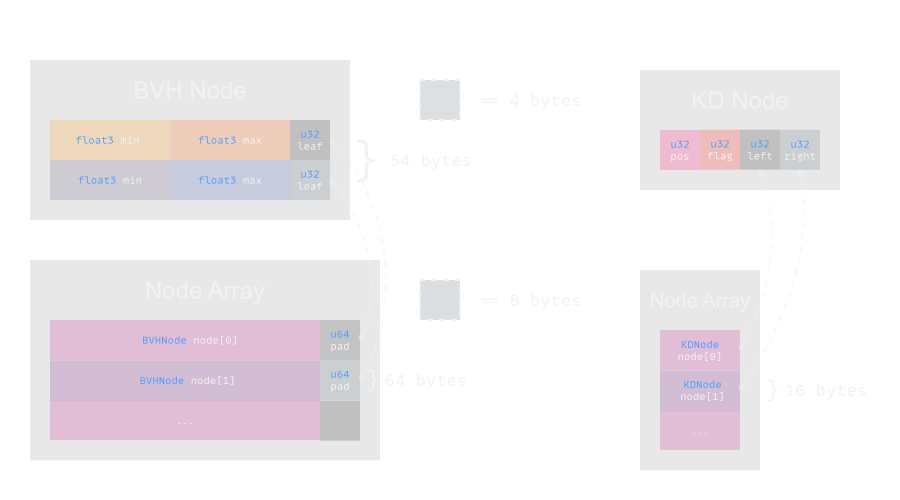
Bounding Boxes can be easily represented with lightweight nodes, for example, this struct can represent a node in as little as 64 bytes (and smaller if you take on compression schemes, use spare bits for cached information like the splitPlane), and you can encode extra data to that payload such as the AABB itself and an address to a triangle, parent, etc. [Meister et al. 2021]
Bounding Volume Hierarchy Node
struct BVHNode { // 📤 Left AABB float3 leftMin; float3 leftMax; // 📥 Right AABB float3 rightMin; float3 rightMax; // *️ Pointers uint leftPointer; uint rightPointer; };
Building a BVH can vary depending on your requirements, with the rule generally being a higher quality BVH is slower to build but can be traversed faster. BVH builders have been categorized as top-down, bottom-up and insertion-based. In general real time builders use fast techniques such as bottom up builders [Benthin et al. 2022] do well due to the highly parallel nature of the GPU.
Contrast a BVH with a KD-Tree, a simpler tree of data which is faster to construct and contains less information per node, but is slower to traverse. [Vinkler et al. 2014]
K-Dimensional Tree Node
struct KDNode { uint parent; uint flags; uint leftPointer; uint rightPointer; };
Notice that both of these examples include pointers, this could be to the triangle itself, but ideally should be to the triangle index stored in a separate list, that way the triangles can be rearanged in case the BVH needs to change due to animations, transformations, procedural geometry, etc. [Bikker 2022]
The Surface Area Heuristic (SAH) function can be used to estimate the efficiency of a BVH. In recent real time builders such as PLOC, this Heuristic is used to better perform splits when building a BVH.
Where is the surface area function, and represents a node. [Pharr et al. 2016]
Thanks to the SAH, we can better estimate the probability that we hit the sub-nodes of a given BVH node through the ratio surface area of their bounding boxes and their parent, which can be useful for optimization passes to the BVH, selecting split planes for building BVHs, optimzing the BVH much more.
// XYZ XYZ XYZ
uint morton = 0b001002003;Morton codes are a small hash value that can encode a 3D position in 32 bits, so in BVH implementations one can use this to easily index a given location (or morton curve space) in the structure when building the hierarchy. Each bit can represent a location in the hierarchy and groups of bits can be used for locations in XYZ space.
A builder can encode the position of box nodes of a BVH as a morton code normalized by the scale of the scene, and easily store and query for that value when building a BVH. This is done by PLOC.
DirectX 12 and Vulkan both support hardware accelerated raytracing and the interface for these APIs is the same. Hardware accelerated ray tracing uses a 2-level BVH, one level for the scene and one for individual meshes.
Building acceleration structures with graphics APIs involves allocating scratch buffers for API and vendor specific data, providing the API with Bottom Level Acceleration Structure (BLAS) data in the form of your index and vertex position buffer, and top level acceleration structures (TLAS) built from your scene hierarchy with their transforms, and the instance of the BLAS the node correspond to.
Basic DirectX 12 Ray Tracing Example
// 👋 Declare Handles ID3D12Device5* device; ID3D12Resource* vertexBuffer; ID3D12Resource* indexBuffer; ID3D12GraphicsCommandList4* commandList; // Declare Outputs ID3D12Resource* asBuffer; ID3D12Resource* asScratchBuffer; ID3D12Resource* instanceDescs; HRESULT hr; // 🌳 Top Level Acceleration Structure D3D12_RAYTRACING_GEOMETRY_DESC geomDescs[1]; geomDescs[0].Type = D3D12_RAYTRACING_GEOMETRY_TYPE_TRIANGLES; geomDescs[0].Triangles.IndexBuffer = indexBuffer->GetGPUVirtualAddress(); geomDescs[0].Triangles.IndexCount = static_cast<UINT>(indexBuffer->GetDesc().Width) / sizeof(UINT16); geomDescs[0].Triangles.IndexFormat = DXGI_FORMAT_R16_UINT; geomDescs[0].Triangles.Transform3x4 = 0; geomDescs[0].Triangles.VertexFormat = DXGI_FORMAT_R32G32B32_FLOAT; geomDescs[0].Triangles.VertexCount = static_cast<UINT>(vertexBuffer->GetDesc().Width) / sizeof(Vertex); geomDescs[0].Triangles.VertexBuffer.StartAddress = vertexBuffer->GetGPUVirtualAddress(); geomDescs[0].Triangles.VertexBuffer.StrideInBytes = sizeof(Vertex); // 🧱 Get prebuild info D3D12_BUILD_RAYTRACING_ACCELERATION_STRUCTURE_INPUTS topLevelInputs[1]; topLevelInputs[0].DescsLayout = D3D12_ELEMENTS_LAYOUT_ARRAY; topLevelInputs[0].Flags = D3D12_RAYTRACING_ACCELERATION_STRUCTURE_BUILD_FLAG_PREFER_FAST_TRACE; topLevelInputs[0].NumDescs = 1; topLevelInputs[0].Type = D3D12_RAYTRACING_ACCELERATION_STRUCTURE_TYPE_TOP_LEVEL; D3D12_RAYTRACING_ACCELERATION_STRUCTURE_PREBUILD_INFO topLevelPrebuildInfo = {}; device->GetRaytracingAccelerationStructurePrebuildInfo(topLevelInputs, topLevelPrebuildInfo); D3D12_BUILD_RAYTRACING_ACCELERATION_STRUCTURE_INPUTS bottomLevelInputs[1]; bottomLevelInputs[0] = topLevelInputs[0]; bottomLevelInputs.Type = D3D12_RAYTRACING_ACCELERATION_STRUCTURE_TYPE_BOTTOM_LEVEL; bottomLevelInputs.pGeometryDescs = geomDescs; D3D12_RAYTRACING_ACCELERATION_STRUCTURE_PREBUILD_INFO bottomLevelPrebuildInfo = {}; device->GetRaytracingAccelerationStructurePrebuildInfo( &bottomLevelInputs, &bottomLevelPrebuildInfo); // 🍱 Create Scratch Buffer D3D12_RESOURCE_DESC asResourceDesc; asResourceDesc.Dimension = D3D12_RESOURCE_DIMENSION_BUFFER; asResourceDesc.Alignment = 0; asResourceDesc.Width = max(topLevelPrebuildInfo.ScratchDataSizeInBytes, bottomLevelPrebuildInfo.ScratchDataSizeInBytes); asResourceDesc.Height = 1; asResourceDesc.DepthOrArraySize = 1; asResourceDesc.MipLevels = 1; asResourceDesc.Format = DXGI_FORMAT_UNKNOWN; asResourceDesc.SampleDesc.Count = 1; asResourceDesc.SampleDesc.Quality = 0; asResourceDesc.Layout = D3D12_TEXTURE_LAYOUT_ROW_MAJOR; asResourceDesc.Flags = D3D12_RESOURCE_FLAG_ALLOW_UNORDERED_ACCESS; // 🍱 Create AS Scratch Buffer hr = device->CreateCommittedResource( &heapProps, D3D12_HEAP_FLAG_NONE, &asResourceDesc, D3D12_RESOURCE_STATE_RAYTRACING_ACCELERATION_STRUCTURE, nullptr, IID_PPV_ARGS(&asScratchBuffer)); // 🍱 Create TLAS Buffer asResourceDesc.width = topLevelPrebuildInfo.ResultDataMaxSizeInBytes; hr = device->CreateCommittedResource( &heapProps, D3D12_HEAP_FLAG_NONE, &asResourceDesc, D3D12_RESOURCE_STATE_RAYTRACING_ACCELERATION_STRUCTURE, nullptr, IID_PPV_ARGS(&tlasBuffer)); // 🍱 Create BLAS Buffer asResourceDesc.width = bottomLevelPrebuildInfo.ResultDataMaxSizeInBytes; hr = device->CreateCommittedResource( &heapProps, D3D12_HEAP_FLAG_NONE, &asResourceDesc, D3D12_RESOURCE_STATE_RAYTRACING_ACCELERATION_STRUCTURE, nullptr, IID_PPV_ARGS(&blasBuffer)); D3D12_RAYTRACING_INSTANCE_DESC instanceDesc = {}; instanceDesc.Transform[0][0] = instanceDesc.Transform[1][1] = instanceDesc.Transform[2][2] = 1; instanceDesc.InstanceMask = 1; instanceDesc.AccelerationStructure = blasBuffer->GetGPUVirtualAddress(); D3D12_HEAP_PROPERTIES uploadHeapProperties = {}; uploadHeapProperties.Type = D3D12_HEAP_TYPE_UPLOAD; uploadHeapProperties.CPUPageProperty = D3D12_CPU_PAGE_PROPERTY_UNKNOWN; uploadHeapProperties.MemoryPoolPreference = D3D12_MEMORY_POOL_UNKNOWN; uploadHeapProperties.CreationNodeMask = 1; uploadHeapProperties.VisibleNodeMask = 1; D3D12_RESOURCE_DESC bufferDesc = {}; bufferDesc.Dimension = D3D12_RESOURCE_DIMENSION_BUFFER; bufferDesc.Alignment = 0; bufferDesc.Width = sizeof(instanceDesc); bufferDesc.Height = 1; bufferDesc.DepthOrArraySize = 1; bufferDesc.MipLevels = 1; bufferDesc.Format = DXGI_FORMAT_UNKNOWN; bufferDesc.SampleDesc.Count = 1; bufferDesc.SampleDesc.Quality = 0; bufferDesc.Layout = D3D12_TEXTURE_LAYOUT_ROW_MAJOR; bufferDesc.Flags = D3D12_RESOURCE_FLAG_NONE; hr = device->CreateCommittedResource( &uploadHeapProperties, D3D12_HEAP_FLAG_NONE, &bufferDesc, D3D12_RESOURCE_STATE_GENERIC_READ, nullptr, IID_PPV_ARGS(instanceDescs)); void* pMappedData; (*instanceDescs)->Map(0, nullptr, &pMappedData); memcpy(pMappedData, &instanceDesc, sizeof(instanceDesc)); (*instanceDescs)->Unmap(0, nullptr); // 🏗️ BLAS build command D3D12_BUILD_RAYTRACING_ACCELERATION_STRUCTURE_DESC bottomLevelBuildDesc = {}; bottomLevelBuildDesc.Inputs = bottomLevelInputs; bottomLevelBuildDesc.ScratchAccelerationStructureData = scratchResource->GetGPUVirtualAddress(); bottomLevelBuildDesc.DestAccelerationStructureData = blasBuffer->GetGPUVirtualAddress(); // 🏗️ TLAS build command D3D12_BUILD_RAYTRACING_ACCELERATION_STRUCTURE_DESC topLevelBuildDesc = {}; topLevelInputs.InstanceDescs = instanceDescs->GetGPUVirtualAddress(); topLevelBuildDesc.Inputs = topLevelInputs; topLevelBuildDesc.DestAccelerationStructureData = tlasBuffer->GetGPUVirtualAddress(); topLevelBuildDesc.ScratchAccelerationStructureData = scratchResource->GetGPUVirtualAddress(); // 🏢 Execute build commandList->BuildRaytracingAccelerationStructure(&bottomLevelBuildDesc, 0, nullptr); D3D12_RESOURCE_BARRIER barrier = {}; barrier.Type = D3D12_RESOURCE_BARRIER_TYPE_UAV; barrier.UAV.pResource = blasBuffer; commandList->ResourceBarrier(1, &barrier); commandList->BuildRaytracingAccelerationStructure(&topLevelBuildDesc, 0, nullptr);
Traversal occurs by executing a ray tracing pipeline with a given graphics API, and further in ray tracing programmable shader steps when calling the builtin TraceRay function.
Ray Tracing HLSL Shader
// 🌎 Global Resources RaytracingAccelerationStructure Scene : register(t0, space0); RWTexture2D<float4> tOutput : register(u0); cbuffer cb : register(b0) { row_major float4x4 projectionMatrix : packoffset(c0); row_major float4x4 viewMatrix : packoffset(c4); float3 origin : packoffset(c8); float near : packoffset(c9.x); float far : packoffset(c9.y); }; [shader("raygeneration")] void raygen() { float2 screenCoords = (float2)DispatchRaysIndex() / (float2)DispatchRaysDimensions(); float2 ndc = screenCoords * 2.0 - float2(1.0, 1.0); float near = .1; float far = 300.0; float3 rayDir = normalize(mul(mul(viewMatrix, projectionMatrix), float4(ndc * (far - near), far + near, far - near))) .xyz; RayDesc ray; ray.Origin = origin.xyz; ray.Direction = rayDir; ray.TMin = 0.1; ray.TMax = 300.0; RayPayload payload = {float4(0, 0, 0.5, 0)}; TraceRay(Scene, RAY_FLAG_NONE, ~0, 0, 1, 0, ray, payload); // Write the raytraced color to the output texture. tOutput[DispatchRaysIndex().xy] = payload.color; }
Tero Karras (NVIDIA) released a 3 part series describing collision detection, tree traversal, and tree construction on the GPU.
Jacco Bikker (@j_bikker) wrote a series of blog posts on BVH construction here.
My Raw DirectX 12 Book - Chapter 4 focuses on ray tracing with DirectX 12 and provides more details on how to execute ray tracing in DirectX 12.
Geometric Tools for Computer Graphics by Philip Schneider and David H. Eberly has a resources page that provides C++ header files for intersection tests for axis aligned bounding boxes as well as other volumes.
There's a video presentation on a Survey on Bounding Volume Hierarchies for Ray Tracing provided by High Performance Graphics.
Computer Graphics at TU Wien gave a lecture on spatial acceleration structures here.
Ray Tracing: The Next Week reviews these concepts as well.
| [McGuire 2018] |
| [Kajiya 1986] |
| [Pharr et al. 2016] |
| [J. Doyle et al. 2012] Hardware Accelerated Construction of SAH-Based Bounding Volume Hierarchies for Interactive Ray Tracing ACM 2012 doi.org |
| [Liktor et al. 2016] |
| [Vaidyanathan et al. 2016] |
| [AMD 2020] |
| [Vaidyanathan et al. 2019] |
| [Benthin et al. 2017] |
| [Karras 2020] |
| [Meister et al. 2021] A Survey on Bounding Volume Hierarchies for Ray Tracing Computer Graphics Forum 2021 meistdan.github.io |
| [Benthin et al. 2022] PLOC++: Parallel Locally-Ordered Clustering for Bounding Volume Hierarchy Construction Revisited ACM 2022 intel.com |
| [Vinkler et al. 2014] |
| [Bikker 2022] |